
Chapter 6 · 6.8
Converting your hosting package to an email package
Do you only use your hosting package for email and no longer have a website? Then you can convert it yourself to an email package. Your mailboxes with all your mail stay in place. Anything related to the website will be removed.
Please note: you can't undo the conversion. Your website, databases and other files will be gone afterwards. If you want to keep something, download it first, for example via File Manager in DirectAdmin.
How to convert your package
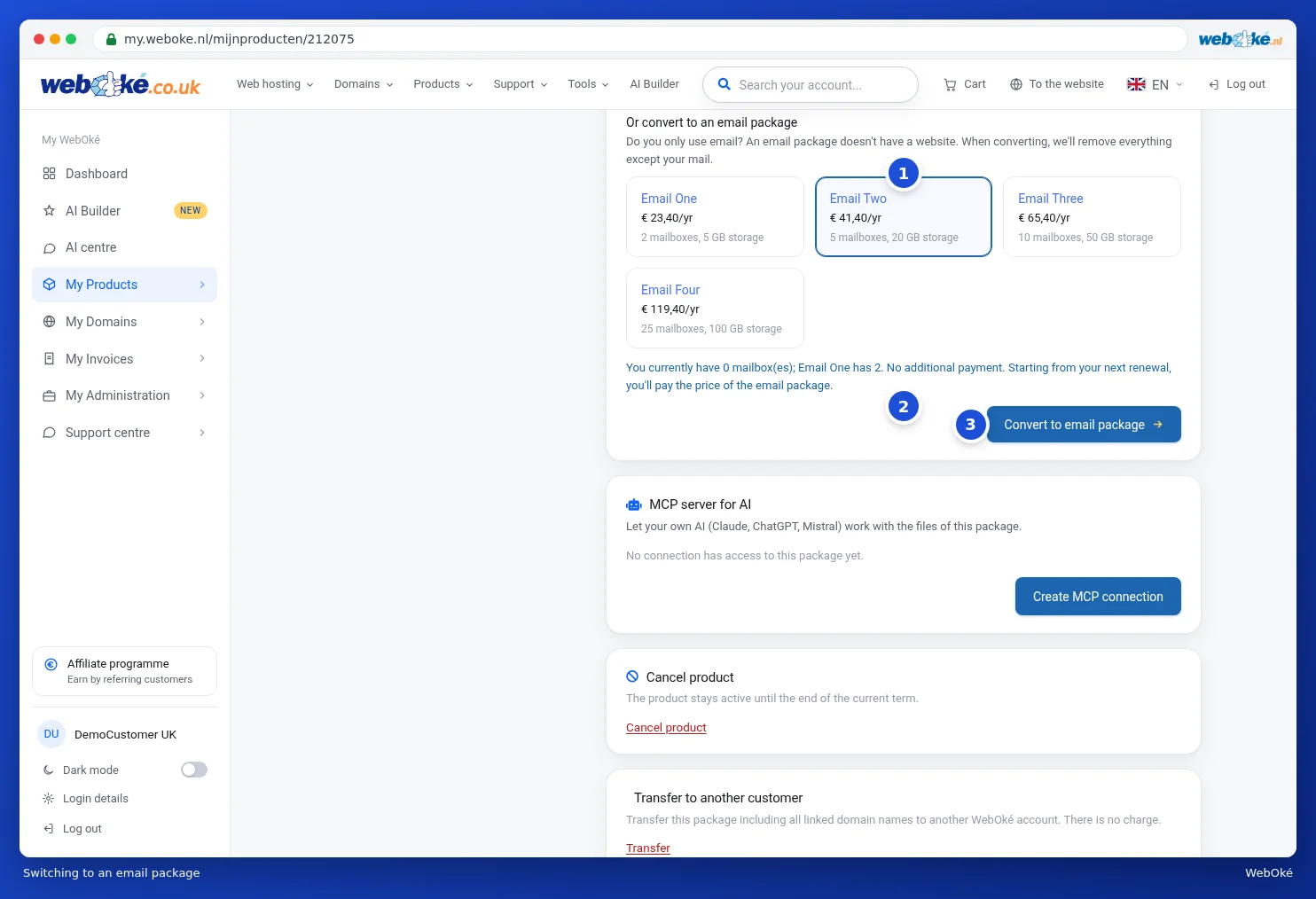
- Open the product page of your hosting package and scroll to Change hosting package. Below the hosting packages you'll find Or convert to an email package.
- Click the email package you want (1). Each tile shows how many mailboxes and how much storage come with it.
- We immediately check whether your current mail fits in that package. You'll see how many mailboxes you currently have and what the new package offers, plus the price (2). If it doesn't fit, you'll see why.
- If everything fits, click Convert to email package (3).
- A window titled Convert to email package opens. It shows exactly what we found in your package and what will be removed (1), for example website files, installations such as WordPress, databases, subdomains, FTP accounts and cron jobs. In green, you'll see what stays: your mailboxes with all mail, forwards, autoresponders, spam filters, DNS and SSL.
- Tick the box to confirm you understand that your website and everything in the list will be permanently deleted (2).
- Type your package's domain name to confirm. Only then can you click Delete everything and convert (3). If you'd rather not, click Cancel.

When isn't this possible?
You'll see a message if the new package is too small or if something's in the way. For example:
- You have more mailboxes or forwards than the email package offers. Delete a few first, or choose a larger email package.
- Your mail uses more storage than the email package offers.
- Your package contains multiple domains. An email package has just one. First move or delete the other domains, see Domains per package and moving a domain.
- Your package has its own IP address. Cancel that first, see Changing options and extra IP addresses.
After converting
If the email package is cheaper, there's no additional payment and you'll pay the price of the email package from your next renewal onwards. If it's more expensive, you'll pay the difference first and the conversion starts after payment. You can see the status on the product page. It's usually done within a few minutes. Only the owner of the account can convert a package.