
Chapter 13 · 13.1
Opening Installatron: what can you install?
Watch it in a short video
With Installatron, you install a complete website in just a few clicks: WordPress, but also, for example, Joomla, Drupal, PrestaShop, Nextcloud, Matomo, MediaWiki or a forum like phpBB. Installatron sets up the files, creates the database, configures your administrator account, and keeps the software updated for you afterwards if you want.
Opening Installatron
- Log in to DirectAdmin (see Signing in via My WebOké).
- In the menu, under Extra Features, click Installatron Applications Installer.
Installatron opens in full screen. At the top, you'll see four tabs:
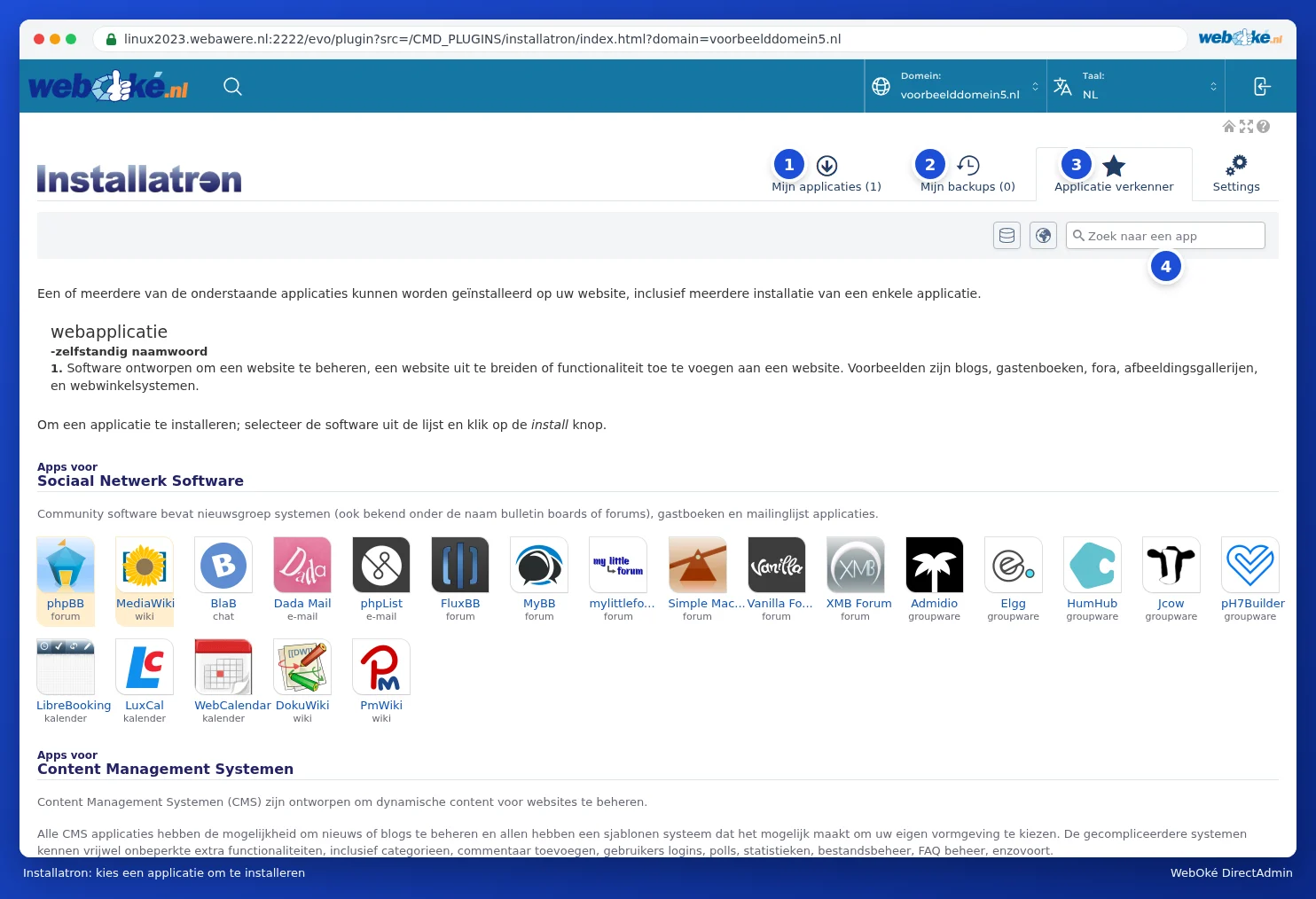
- My Applications (1): the websites you've installed with Installatron. Here you can update them, make a backup, clone them, or delete them.
- My Backups (2): the backups Installatron has made.
- Application Browser (3): all the software you can install, by category. Use the Search for an app field (4) to quickly find what you're looking for.
- Settings: general settings for Installatron. You usually don't need to change anything here.
In the top right, in the blue bar, choose which domain you're working on under Domain, and the language of Installatron under Language. Use the button on the far right to go back to DirectAdmin.
Under Recommended Applications in the DirectAdmin menu, a few applications are highlighted. These links open the same Installatron, taking you straight to that application.
What should you choose?
| You want | A good choice |
|---|---|
| A website or blog, including a webshop | WordPress (with WooCommerce for a webshop) |
| A larger website with a lot of structure | Joomla or Drupal |
| A webshop with lots of products | PrestaShop |
| Visitor statistics without Google | Matomo |
| A knowledge base or wiki | MediaWiki or DokuWiki |
| A forum | phpBB |
The Installatron screen stays blank
Do you see a blank or white area when you open Installatron? Then try the following:
- Refresh the page (F5), or click Installatron in the menu again.
- Has your session expired, for example because you haven't done anything for a while? Then log in again via My WebOké (see Signing in via My WebOké) and open Installatron again.
- Installatron runs in a frame within DirectAdmin. An ad blocker, privacy extension, or strict cookie setting can block this. Disable the extension for the server, or try a different browser or a private window.
- Use the Website Manager in My WebOké. You can do most things with it too, without DirectAdmin (see Can I also do this in My WebOké? The Website Manager).
If the screen stays blank, open a ticket and let us know which browser you're using.
Tip: Prefer to use WordPress without DirectAdmin? In My WebOké, you can also install and manage WordPress using the Website Manager (see Can I also do this in My WebOké? The Website Manager). Behind the scenes, this uses the same Installatron.